

You can listen to music from your Bluetooth® device, such as portable audio player through the System.
When you connect your device for the first time, it is necessary to register (pair) your Bluetooth® device and the System.
Connecting a Bluetooth® device.
Set the source to “Bluetooth®”.
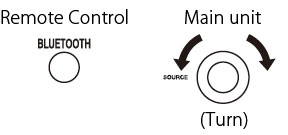
The “CONNECTING” indicator blinks, and the “Bluetooth icon ” icon (Bluetooth® icon) flashes slowly.
The System will connect automatically to the Bluetooth® device that was last connected.
“CONNECTED” is displayed and the “  ”icon (Bluetooth® icon) lights up.
CONNECTED
- The pairing operation is necessary when you connect the Bluetooth® device for the first time, or connect the System to the new Bluetooth® device.
- When “ Bluetooth icon” icon (Bluetooth® icon) lights up, cancel the connection once by pressing and holding the [Bluetooth®] on the remote control or [(PAIRING)
 ] on the System.
“DISCONNECTED” is displayed then the display disappears.
Set the System to pairing standby.
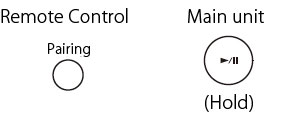
The “Bluetooth icon ” icon (Bluetooth® icon) flashes quickly.
[] on the main unit cannot be used while “CONNECTING” is displayed. Use “PAIRING” on the remote control.
Turn on the Bluetooth® function on the Bluetooth® device.
- Select “Bluetooth” from “Settings” on the iPod touch/iPhone and Android device.
- Refer to the instruction manual of your device for further details.
Select “AP-300” from the list of device.
The pairing is completed and the Bluetooth® device is connected to the System automatically.
- When the target device requests for password during pairing, enter “0000”.
Start playback on the Bluetooth® device.
The sound from the Bluetooth® device is emitted from the System.
NOTE
- Up to 9 Bluetooth® devices can be registered. When the 10th Bluetooth® device is registered, registration of the device with the oldest connection history is deleted.
- Some Bluetooth® devices may not be available to the System.
Playing back
You can connect to and play back from the Bluetooth® device that was last connected to the System.
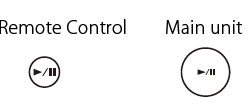
To pause
- To cancel pause and start playback, press the button again.
To select a track
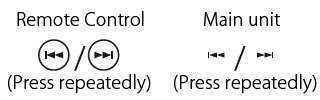
- Press [
 ] once to skip to the beginning of the next track.
 - Press [
 ] to skip to the beginning of the track being played. Press twice to skip to the beginning of the previous track.
To fast forward/reverse
During playback...
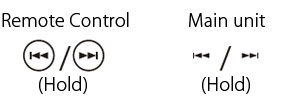
- To fast reverse, press and hold [].
- To fast forward, press and hold [].
- To resume normal playback, release the button.
Canceling the connection
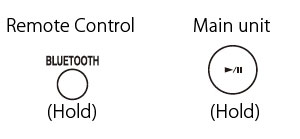
DISCONNECTED
NOTE
The connection is canceled automatically in the following cases.
- Connection is canceled on the Bluetooth® device, or Bluetooth® function is set to OFF.
- When the System or the Bluetooth® device is turned off.
- When the source is changed to another audio sources.
CAUTION
- To connect the device to this System, the device must be compatible with the Bluetooth® A2DP and AVRCP profiles.
- The maximum distance for a possible Bluetooth® connection is 10 m. The distance may be shorter depending on the usage environment.
- When the iPhone or smartphone is connected to the System via Bluetooth®, ring alert of phone calls and mails can also be heard from the speakers of the System.
- This System is not equipped with a microphone feature. To make a call, cancel the connection with the System or use the microphone on the iPhone or smartphone.
Compatible iPod
| Made for (Version) | Version* |
|---|---|
| iPod nano (7th generation) | 1.0.2 |
| iPod nano (6th generation) | 1.2 |
| iPod nano (5th generation) | 1.0.2 |
| iPod nano (4th generation) | 1.0.4 |
| iPod nano (3rd generation) | 1.1.3 |
| iPod nano (2nd generation) | 1.1.3 |
| iPod touch (5th generation) | 7.0.2 |
| iPod touch (4th generation) | 6.1.3 |
| iPod touch (3rd generation) | 5.1.1 |
| iPod touch (2nd generation) | 4.2.1 |
| iPod touch | 3.1.3 |
| iPhone 5S | 7.0.2 |
| iPhone 5C | 7.0.2 |
| iPhone 5 | 7.0.2 |
| iPhone 4S | 7.0.2 |
| iPhone 4 | 7.0.2 |
| iPhone 3GS | 6.1.3 |
| iPhone 3G | 5.1.1 |
* Software version at the time of operation confirmation
- Reset your iPod/iPhone if your iPod/iPhone is not playing back correctly. (Please visit Apple's homepage for information about resetting your iPod/iPhone.)
- For details on the iPod/iPhone, check Apple's web site.
<https://www.apple.com> - To check the latest supporting status of the iPod/iPhone, refer to the product information on our home page.
Playable Bluetooth® devices
- To connect the device to this System via Bluetooth®, the device must be compatible with the A2DP and the AVRCP profiles.