| [1] |
Double-click on the [AMG LASSO-DB update software] icon on the desktop.
The main window of this software appears.
| |
| Memo● |
This software can also be launched by opening the Start menu and selecting [All Programs] →
[KENWOOD] → [AMG LASSO-DB update software] → [AMG LASSO-DB update software]. |
|
| |
 |
| [2] |
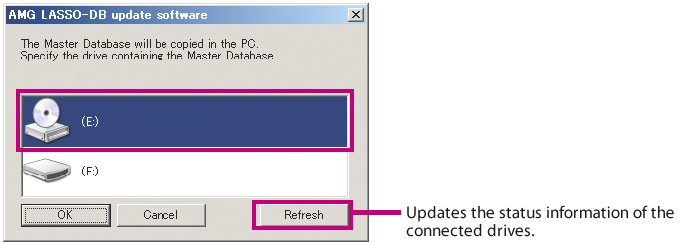
Insert the AMG Database CD in the CD-ROM drive of the PC.
Use the AMG Database CD provided with K-511USB.
Select the drive containing the CD and click on
the [OK] button.
The master database will be copied in the PC.
 |
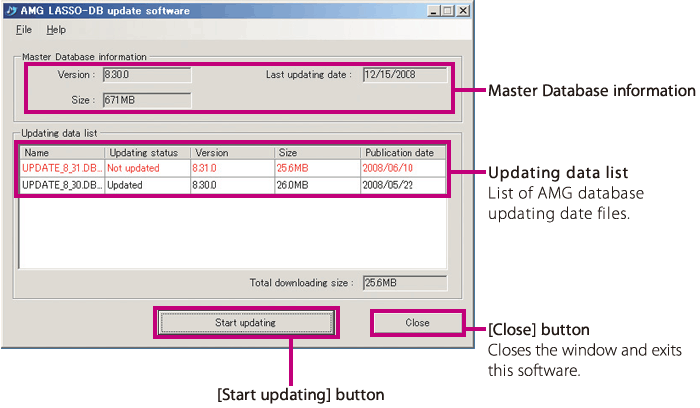
| When the master database has been copied, the PC downloads the AMG database updating information from
the KENWOOD server automatically. |
 |
|
"Updating status" information
Not updated: The database is neither downloaded nor updated.
Downloaded: The database has been downloaded.
Updated: The database has been downloaded and updated.
|
| |
|
| [3] |
Start updating the master database in the PC.
 |
Click on the [Start updating] button in the window to start the
database updating. |
When there is more than one piece of updating information: |
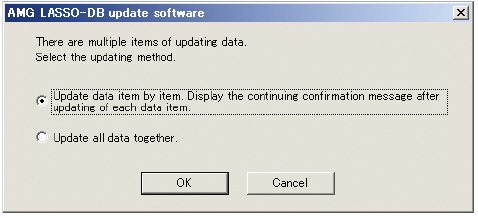 |
The window shown on the left appears after [Start updating]
is selected. Select the updating method and click on the [OK]
button.
●[Update data item by item. Display the continuing confi rmation message after updating of each data item.]
Confi rms every piece of updating data before applying it in the database updating.
●[Update all data together.]
Updates the database using all of the updating data.
When the database has been updated, the window for copying the master database appears. Follow the displayed instructions to copy the master database in the SD/SDHC card.
Memo ● Updating may take a long period depending on the type of the PC in use. |
|
| |
|
| [4] |
Insert an SD/SDHC card in the PC.
Insert the card in the SD/SDHC card slot of the PC or the SD/SDHC card reader/writer. |
| |
|
| [5] |
Copy the updated database in the SD/SDHC card. |
| |
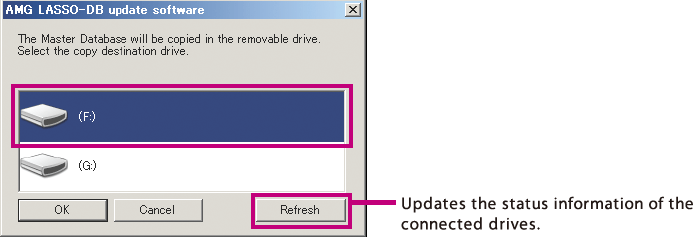
Select the drive containing the SD/SDHC card and
click on the [OK] button.
The updated master database will be copied in the SD/
SDHC card.
When the [File Overwrite Confirmation] window appears,
click on the [Yes] button to overwrite the existing
database. |
|
| |
|
| [6] |
Click on the [Close] button to finish. |